Introduction
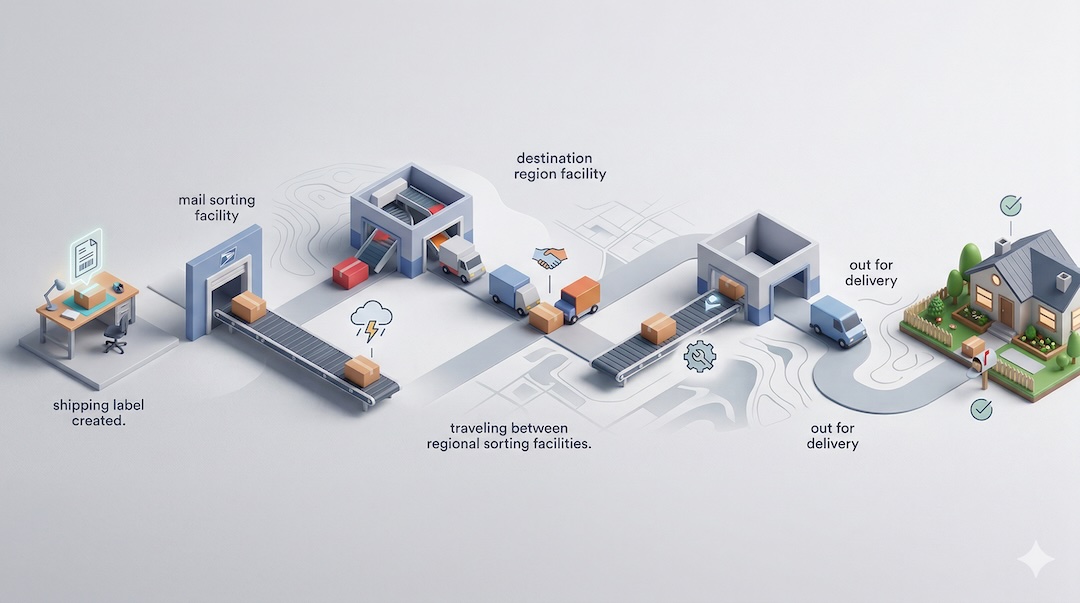
USPS tracking updates are best understood as status checkpoints rather than continuous, real-time location reporting. A package may travel through multiple facilities or transportation steps without showing every movement publicly.
This guide explains common USPS tracking scans such as Label Created, In Transit, Destination Arrival, and several delay-related messages. The goal is to help readers understand what each status usually means, what might happen next, and when a shipment may need closer attention.
Tracking timing can vary based on the mail class, route, processing volume, weather, transportation handoffs, and whether another shipping partner is involved before USPS handles final delivery.
What USPS Tracking Scans Mean
A USPS tracking scan is a recorded event showing that a package was accepted, processed, transported, sorted, or prepared for delivery. These scans help show progress through the mail network.
Not every movement receives a public-facing scan. A package can still be moving even if the tracking page does not show each facility stop or transportation leg.
Updates also do not always appear instantly. In some cases, scans post later or appear in batches after processing catches up.
Label Created: What It Means
Label Created usually means a shipping label was generated, but USPS may not yet have physical possession of the package. This status often appears before the first acceptance scan.
It can remain unchanged for a short time for several common reasons:
- The sender prepared the shipment but has not handed it over yet.
- USPS has the package, but the first acceptance scan has not posted publicly.
- A third-party shipping partner is still moving the parcel toward USPS for final handling.
If this is the current status, the most practical next steps are:
- Wait for the first acceptance or processing scan.
- Confirm with the sender when the parcel was actually handed off.
- Recheck tracking over the next 24 to 48 hours.
If Label Created remains unchanged for several business days, the sender is often the best first contact, especially if USPS has not yet shown possession.
Accepted, USPS in Possession of Item
Accepted or USPS in Possession of Item means USPS has physically received the package. This is usually the first strong confirmation that the shipment has entered the USPS network.
After this scan, later updates may not appear immediately. A package can be moving to its next facility even if the tracking page stays unchanged for a period of time.
In Transit: What It Usually Covers
In Transit is a broad status. It generally covers movement between USPS facilities, sorting operations, transportation between regions, and routing toward the destination area.
Repeated In Transit updates do not always mean the package is receiving a new physical scan every hour. Sometimes the system applies generic transit messaging while the shipment continues through normal handling.
Some parcels show only limited detail during this stage. That means a package may pass through multiple steps without every one appearing on the public tracking page.
Arrived at USPS Regional Facility or Similar Processing Scans
When tracking shows Arrived at USPS Regional Facility or a similar processing scan, it usually means the package reached a sorting or distribution center.
Regional facility scans can appear multiple times during long-distance travel. A shipment may move through more than one processing center before it reaches the destination area.
A departure scan from the same facility may appear later, or it may not always show publicly. That does not necessarily indicate a problem by itself.
Destination Arrival: What Readers Should Know
Destination Arrival generally means the package has reached the destination region or a nearby processing area. This is usually a sign that the shipment is getting closer to final delivery.
However, it does not necessarily mean the package is at the local post office or going out for delivery immediately. Another processing step may still happen before the package is sent to the delivery unit responsible for the address.
Delivery timing can still depend on local routing, weekend schedules, and the mail class used for the shipment.
Out for Delivery and Delivered
Out for Delivery means the package has been assigned for delivery that day. In many cases, this is the last major status before completion.
Delivered indicates USPS marked the item as delivered to the listed address or delivery point.
If tracking shows Delivered but the package is not immediately visible, it is reasonable to check:
- Inside or around the mailbox
- A parcel locker
- The porch or main entrance area
- A building mailroom or package area
- With others at the address who may have accepted it
Common USPS Delay Messages
USPS tracking sometimes shows wording that indicates slower-than-expected movement. Common examples include:
- In Transit, Arriving Late
- Moving Through Network
- Processing Exception
- Weather-related or transportation-related delay messages
These updates usually mean the shipment is delayed, not necessarily lost. Tracking may pause temporarily during congestion, severe weather, holidays, transportation disruptions, or facility backlogs.
A delay message is most useful when viewed together with the latest scan location and timestamp. A single delay update often does not tell the full story on its own.
Why Tracking Sometimes Stops Updating
A package can still be moving even when no new public scan appears. Tracking gaps happen for several reasons:
- Missed or delayed physical scan
- Transfer between facilities
- Limited weekend or holiday processing
- High shipping volume
- Routing through third-party consolidators before USPS final handling
Depending on the shipment, a gap of a day or more between updates can happen without meaning the package is lost.
Estimated Delivery Date vs. Actual Movement
Estimated delivery dates are projections, not guarantees. They can change as the shipment moves through the network or encounters delays.
When judging current progress, the actual tracking event timestamps are usually more useful than the estimate alone. The latest scan and its location context often provide the clearest picture of what stage the package has reached.
When a Status May Need Attention
Some situations deserve closer review, especially if the tracking pattern does not progress as expected. Examples include:
- Label Created remains unchanged for several business days
- The package repeats the same transit message for an extended period
- Tracking shows Delivered but the item cannot be found
- The parcel appears to move away from the destination repeatedly
If the first USPS scan never appears, checking with the sender first is often the most practical step.
What Readers Can Do During a Delay
When a package seems slow, it helps to take measured steps rather than assuming it is lost immediately.
- Recheck tracking periodically for new scans.
- Compare the latest update with the expected delivery window.
- Contact the sender if the item has not been accepted by USPS.
- Contact USPS through official support channels if the package is already in the USPS network and appears stalled.
- Keep the tracking number and shipment details ready when requesting help.
USPS Tracking Terms Readers Often Confuse
| Tracking Term | What It Usually Means |
|---|---|
| Label Created | A shipping label exists, but USPS may not yet have the package. |
| Accepted | USPS has physically received the package. |
| In Transit | The package is moving through processing or transportation steps between facilities. |
| Arrived at Regional Facility | The package reached a sorting or distribution center. |
| Destination Arrival | The shipment reached the destination region, but may still need more processing before delivery. |
| Out for Delivery | The package has been assigned for delivery that day. |
| Delivered | USPS marked the package as delivered to the address or delivery point. |
| Delivery Attempted | USPS tried to deliver the item but could not complete delivery at that time. |
FAQ
Does Label Created mean USPS has my package?
Not necessarily. It usually means the label was made, but USPS may still be waiting to receive the parcel or post the first physical scan.
Why does In Transit stay the same for days?
In Transit is a broad status, and some shipments do not receive frequent public scans. Delays, missed scans, transportation handoffs, and high volume can all cause this message to remain unchanged for a period of time.
Does Destination Arrival mean delivery is today?
No. It usually means the package reached the destination region or a nearby processing area. It may still need additional sorting before it reaches the local delivery unit.
Can a package be delivered without every scan showing?
Yes. USPS tracking does not always display every processing or transportation step. Some packages receive fewer public updates than others.
What should I do if tracking says Delivered but I do not have the package?
First check around the delivery area, mailbox, parcel locker, porch, and building mail area. Also check with others at the address. If the package still cannot be found, review the tracking details and contact USPS through official support channels for further assistance.
Conclusion
USPS tracking scans show shipment milestones rather than every physical move a package makes. Statuses such as Label Created, In Transit, and Destination Arrival each describe different stages in the mail network.
In most cases, the best approach is to watch for scan progression, allow time for delayed updates, and focus on the latest timestamp and location context. If a shipment appears unusually stalled, contact the sender first when USPS has not yet accepted it, or contact USPS through official support channels when the package is already in the network.